

Order imports from Shopify
Every Shopify order becomes a TaroStack sales order, and it follows the store afterwards.
What it does
Each order placed on your store becomes a sales order in TaroStack, with its lines matched to your items. It counts as promised stock, and the planner counts it as demand.
When to use it
Orders import by themselves. Open Sales to work them, or to see what's promised and what's short.
Before you start
Match the order's products. A line for a variant left out of the sync isn't stock TaroStack can ship.
Steps
- Place an order on the store, or create one in Shopify and mark it paid.
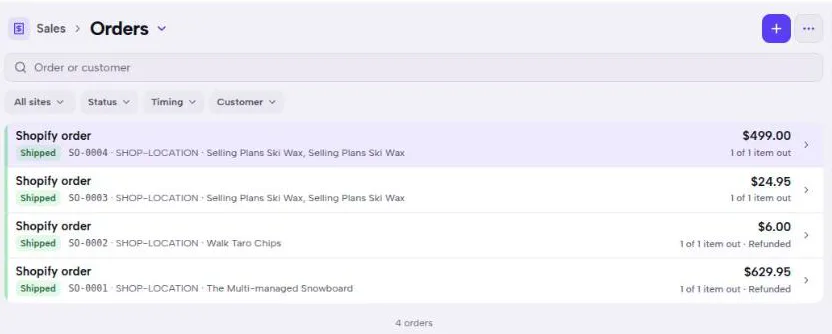
- Open Sales in TaroStack.
- Press the new order to open it.
What you should see
The order is listed as Shopify order, and its notes name the Shopify order number. It usually arrives in under 30 seconds.
Good to know
The order follows the store. If a customer changes a quantity, adds a line or takes one off, the TaroStack order changes too. A line taken off stays on the order at nothing, so you can see it was ordered.
Nothing drops below what has already shipped. A refund brings stock back rather than editing the sale away.
Cancelling an unfulfilled order in Shopify cancels it in TaroStack. Deleting a cancelled order in Shopify leaves it cancelled in TaroStack.
A store's orders appear in Sales as Shopify order until they have a customer you've added. Both systems keep the order number, so you can find it from either side.