

Understanding Home
Home shows the day's sales, what needs you, and the six actions used most.
What it does
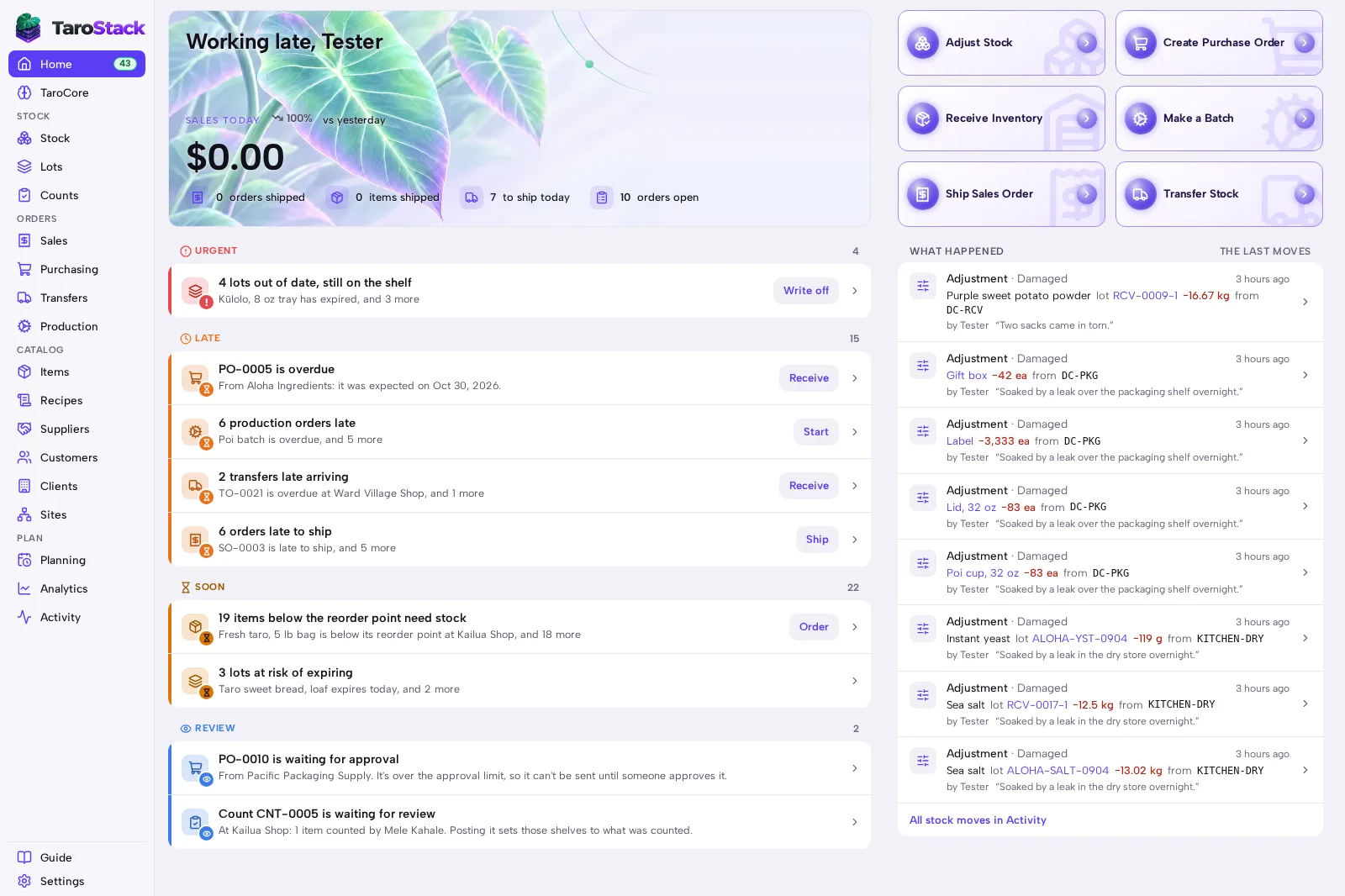
Home is the first page you see. It shows today's sales, lists what needs you, and offers the six actions most people use each day.
When to use it
Open it at the start of the day to see what's late, what's short and what's about to expire. Come back to it whenever you want to know what's next.
Before you start
Nothing has to exist first. A new business sees Get set up, a list of first steps, until they're done.
Steps
- Open Home from the sidebar.
- Read the lists from the top, starting with URGENT, then LATE, SOON and REVIEW.
- Press a line's button to act on it. Receive opens the delivery, and Order opens what's running low.
- Use the six actions at the top for work that doesn't come from a list: Adjust Stock, Create Purchase Order, Receive Inventory, Make a Batch, Ship Sales Order and Transfer Stock.
What you should see
Each line names the record and what it's waiting for. The number beside Home in the sidebar counts what needs you. When something is dealt with, its line goes away.
Good to know
WHAT HAPPENED lists the last stock moves and who made them. The full history is in Activity.
Lines on Home come from your records, and nothing on the page changes stock until you press a button and confirm.
If something is wrong with the store's connection, Home lists it with the day's alerts.